Four different machines are sold as a pattern cutting machine, and they do not do the same job. This guide explains what each one actually produces, which suits your weekly volume, what each costs to run, and how to start with one and upgrade later without changing your software.
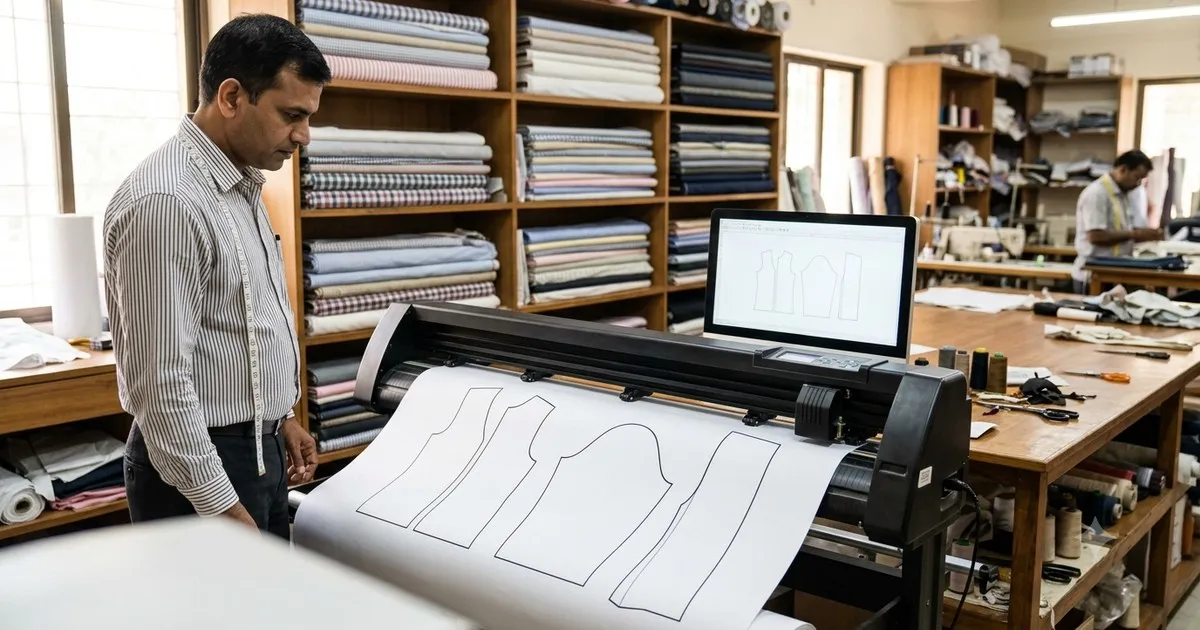
CAD pattern printer and plotter printing full size garment patterns on roll paper in a tailoring workshop
A tailor goes to an exhibition to buy a pattern cutting machine. He is shown a printer, a plotter, a projector and a laser cutter, in that order, each by someone certain that theirs is the right one. He leaves with four quotations and no way to compare them.
The confusion is fair, because the four machines sit at different points of the same job. Two of them give you paper. One gives you light. One cuts the cloth itself.
In this guide you will find:
What each of the four machines actually produces
Which one suits your weekly volume
What each costs to run, beyond the purchase price
The space, power and ventilation each one needs
How to start small and upgrade without losing your patterns
The mistakes that lead to buying the wrong one
The Four Pattern Cutting Machines at a Glance
Machine | What comes out | Best for | What it does not do |
|---|
CAD pattern printer | Full-size pattern on plain paper | Shops that want an exact pattern and are happy to scissor-cut | Does not cut anything |
Pattern plotter | Full-size pattern on wide roll paper, larger and faster | Mixed daily work: blouse, chudidhar, kurti, gents | Does not cut fabric |
Cutting projector | The pattern projected as light onto the cloth | Starting accurately with the least outlay, no paper at all | Nothing to file or reuse physically |
Laser cutting machine | The fabric itself, cut with a sealed edge | High volume, net and embroidered work | Needs a fixed position, power and extraction |
Two rules follow from that table. If you want a pattern you can keep, you need a printer or a plotter. If you want to stop cutting by hand, you need a laser.
Type 1: The CAD Pattern Printer
The simplest of the four. The software drafts the pattern and the printer puts it on plain paper at full size. You lay the paper on the cloth and cut with scissors as you always have.
Lowest cost of the four, and the smallest footprint - it sits on a table.
Plain paper works; special pattern paper is not required.
Nothing about the cutting itself changes, so staff need no retraining.
The drafting time disappears, which is where the hours actually go.
This is where most shops should start if the problem is redrawing patterns rather than cutting speed.
More detail is on the CAD pattern printer page.
Type 2: The Pattern Plotter
A plotter is the same idea at a larger scale. It takes continuous roll paper, normally 15 inches wide, and handles bigger and longer patterns without joining sheets.
Handles chudidhar tops, kurtis, gowns and gents wear in one pass.
Faster on volume, because it does not stop and start per sheet.
Needs a stand and clear space behind it for the paper to feed.
Roll paper bought by the box is the main running cost.
Check the roll width against your largest pattern piece, not your average one. A plotter that cannot take your biggest piece in a single pass will cost you time on every order.
More detail is on the pattern cutting machine and plotter page.
Type 3: The Cutting Projector
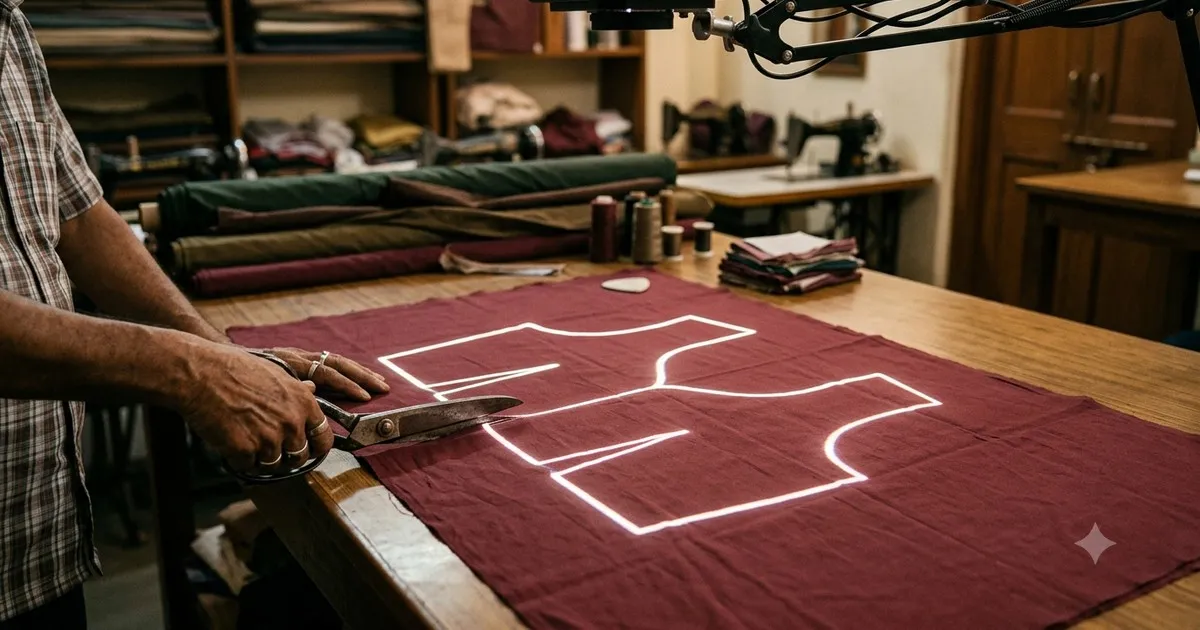
Blouse cutting projector throwing a pattern outline of light directly onto fabric on the cutting table
A projector mounted above the cutting table throws the graded pattern onto the cloth as light. You cut along the projected line. There is no paper and no tracing at all.
The lowest outlay of any accurate method, because there are no consumables.
Nothing to store, and nothing to run out of on a busy morning.
Needs a fixed mounting and reasonably controlled light - direct sunlight washes out the line.
One table at a time, since the pattern is thrown onto that surface.
It is the practical answer for a shop that wants to stop marking by hand but is not ready to buy paper and a printer every month.
More detail is on the blouse cutting projector page.
Type 4: The Laser Cutting Machine
The laser is the only one of the four that touches the fabric. The software sends the pattern and the machine cuts the cloth directly, sealing synthetic and blended edges as it goes.
Removes manual cutting completely, which is the largest labour saving available.
The sealed edge is why net, tissue and heavily embroidered work become practical.
Every piece in a run is identical, so a size exchange is a swap rather than an alteration.
Needs a fixed position, power and extraction for the fumes.
It earns its place at volume. Below roughly forty garments a week it spends most of its time idle and a plotter pays back faster.
More detail is on the laser cutting machine page.
Which Pattern Cutting Machine Fits Your Shop?
Volume decides this more than anything else. Be honest about the number, not the ambition.
Garments a week | Sensible choice | Why |
|---|
Under 10 | Projector, or printer | The saving is drafting time; a laser would idle |
10 to 40 | Pattern printer or plotter | Fabric saving and repeatable fit start to add up |
40 to 100 | Plotter | Drafting stops being the bottleneck |
Over 100, or bulk orders | Laser, with a plotter alongside | Cutting labour disappears |
Heavy embroidery, net, tissue | Laser | The sealed edge saves the re-work fraying causes |
Two cutting tables running | Plotter plus projector | One table on paper, one on light |
What Each One Costs to Run
The purchase price is the number everyone compares. These are the numbers that decide what the machine really costs over three years:
Machine | Main running cost | Also budget for |
|---|
Pattern printer | Plain paper, ink or toner | Occasional head cleaning |
Plotter | Roll paper by the box, pen refills or blades | Paper storage space |
Projector | Almost none - lamp or LED life | Mounting and any light control |
Laser | Tube replacement, power, extraction filters | Annual servicing, ventilation |
Ask every supplier for the total of machine, software, consumables at your real monthly volume, training and support after year one. The machine price alone is the least useful figure in the quote.
Space, Power and Installation
Printer: a table. No special power, no ventilation.
Plotter: a stand plus clear space behind for the paper feed. Normal power.
Projector: a fixed mounting above the table, and a blind or a shaded corner if the room gets direct sun.
Laser: a permanent position, dedicated power and extraction to the outside. Plan this before ordering.
The laser is the only one that changes your premises. If that is a problem, it is a genuine reason to choose a plotter instead, not a detail to sort out later.
Mistakes That Lead to the Wrong Machine
1. Buying for the Volume You Hope For
A laser bought for the orders you plan to win idles until they arrive, and idle equipment does not pay an instalment. Buy for this year and upgrade when the volume is real.
2. Comparing Machines Without Comparing the Software
The machine is half the system. If the drafting software behind it is different, you are comparing two different products, and changing software later means re-entering every pattern you have stored.
3. Forgetting the Consumable at Real Volume
Roll paper looks cheap per metre and substantial per month. Work it out at your own volume before the quotation is signed, not after.
4. Accepting a Demo on the Supplier’s Sample File
Bring the measurements of a customer whose garment gave you trouble last month, and ask for that one to be drafted and produced in front of you. A demo that ends on screen has not shown you anything you can cut.
Starting Small and Upgrading Later
This is the question worth asking before you buy anything, and the answer decides whether your first purchase is a step or a dead end.
Keep the drafting software common across the machines. That is what makes an upgrade a change of hardware rather than a fresh start.
Confirm that patterns you enter today will still open when you move to the next machine.
Start where your bottleneck actually is: drafting time points to a printer, cutting time points to a laser.
Add the second machine rather than replacing the first. Most shops end up running a plotter and a laser side by side.
Plans and what each one includes are on the tailoring CAD software price page.
Questions Tailors Ask
What is a pattern cutting machine, exactly?
In everyday use it means any machine that turns a digital pattern into something you can work with - paper you cut around, light you cut along, or fabric already cut. Which of the four a supplier means depends on the supplier, so ask what comes out of it.
Can an ordinary A4 printer be used instead?
Only by printing the pattern in segments and taping them together, which reintroduces exactly the inaccuracy a full-scale machine removes. Fine for checking a draft, not for cutting cloth.
Is a projector accurate enough for silk?
Yes, once it is calibrated to the table. Calibration is a one-time setup and is only re-checked if the projector is moved.
Does a laser damage delicate fabric?
On synthetics and blends it seals the edge cleanly. On velvet and some natural fibres it can mark, so test on an offcut of the actual cloth before committing a customer’s fabric.
Which machine saves the most fabric?
All of them save cloth compared with hand marking, because the software places the pieces rather than the eye. Shops typically report 5 to 15 percent, and the saving is largest on expensive cloth.
Can one shop use more than one?
Commonly, yes. A plotter for paper patterns that get filed and reused, and a laser for the bulk runs, is the arrangement most growing shops settle on.
See All Four Working Before You Choose
The fastest way to end the confusion is to watch the same pattern come out of each machine, drafted from measurements you brought yourself.
Book a free demo and bring one customer’s measurements. On-site or online, in your language, with no commitment.